It should be noted that this problem is not related to any specific keyboard manufacturer and requires changes to the settings of the operating system itself. If you encounter a similar problem, try using the tips below.
💡Check the system keyboard settings and uncheck all the boxes.
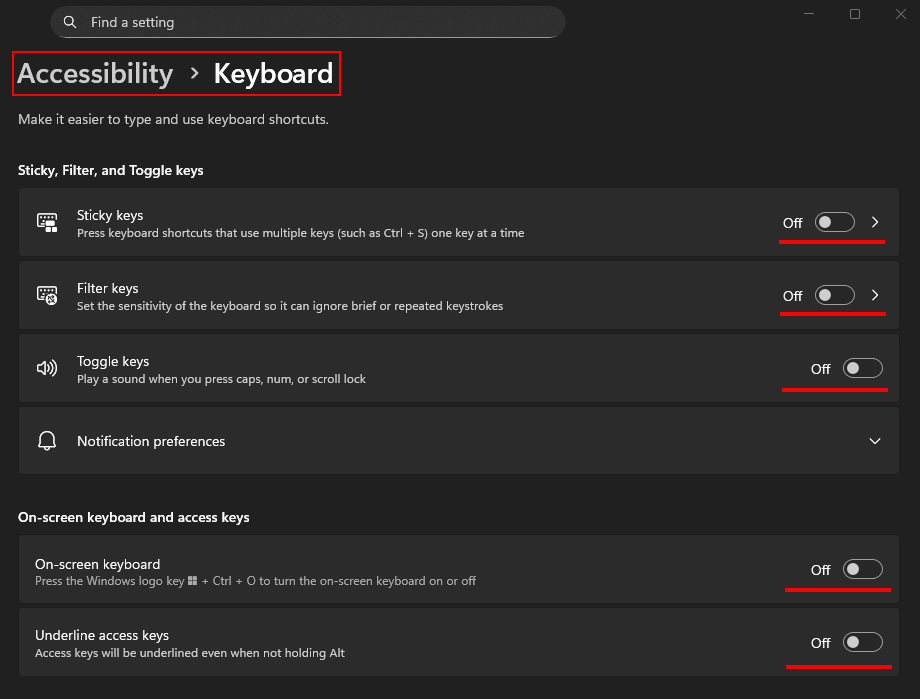
💡Press and hold both Shift keys for five seconds.
💡Try switching the input mode from NKRO to 6KRO and reconnect the keyboard to the computer (switch using the key combination specified in the user manual or through the keyboard software).
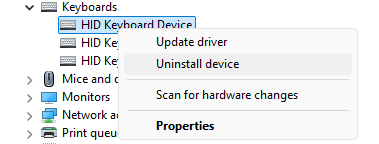
💡Uninstall the keyboard device/driver in Windows Device Manager and restart your computer. Do the following: press the Win+X key combination, select "Device Manager", expand the list of "Keyboards" devices and uninstall them one by one.
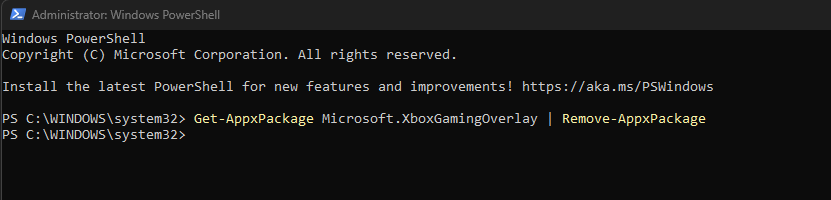
💡Try uninstalling Xbox Game Bar. Find PowerShell in the Start menu, right-click it, and select "Run as administrator". Run the uninstall command, type the following command, and press Enter:
Get-AppxPackage Microsoft.XboxGamingOverlay | Remove-AppxPackage
💡A computer may have several programs that have their own overlay - this is an element, graphic layer or interface that is superimposed on top of the main content (image, video, game or screen), without replacing it completely. One of these overlays can intercept key presses to activate some additional functions. Try disabling such overlays one by one and testing the operation of the keys without them.
💡If you have a magnetic keyboard, calibrate the switches in the manufacturer's software.
💡You can also check the health of the switch/key itself. We recommend connecting the keyboard to a device with a different operating system (Linux, macOS, Android, etc.) and observing the behavior of the keys there.
💡In the case of wireless keyboard models, this behavior of the keys can be caused by a poor connection between the keyboard and its transmitter. Try to place the transmitter closer to the keyboard (on the desk) and change the USB connection port of the transmitter. Compare wireless and wired performance.
