Users of Linux-based operating systems need to add rules with device identifiers, this will help to correctly recognize and manage specific equipment. Failure to do so may result in limited or no operation of the web version of the HATOR SyncHUB configuration software.
What needs to be done?
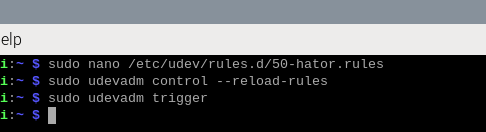
Press the keyboard shortcut Ctrl+Alt+T to open the terminal window. Once the terminal window opens, enter the following command:
sudo nano /etc/udev/rules.d/50-hator.rules
This command will launch the text editor window. In this window, you need to paste/print the following text:
KERNEL=="hidraw*", SUBSYSTEM=="hidraw", ATTRS{idVendor}=="379a", ATTRS{idProduct}=="1800|1801|1802|1803|1804|1805|1806|1807|1808|1809", GROUP="plugdev", MODE="0660"
After entering the above information (rules), press the keyboard shortcut Ctrl+S(save) and Ctrl+X(close). The text editor will close and you will be taken to the initial terminal window. To apply the new rule, enter the following commands:
sudo udevadm control --reload-rulessudo udevadm trigger
After that, you can close the terminal window and check the operation of your device with HATOR Web SyncHUB.
To check your browser's compatibility with web resources of this type (which work via WebHID), you can visit a very useful website at: https://caniuse.com/webhid
