For Pulsar 3 mice (HTM610 v1.0, serial numbers starting with HT2024*********) a new firmware version is available that synchronizes the backlighting of the scroll wheel and the rear of the mouse body, allowing you to choose matching backlight colors or turn it off completely. The DPI profile switching is indicated by three flashes of the wheel backlight.
To begin with, you need to connect the mouse to a computer with OS Windows and download special software from our website at the following link: download
Next, you need to unpack the archive to a convenient place on your computer.
Right-click on the file and select "Extract All" - a folder with files for updating the firmware will appear on your computer.
Among the received files, find and run the file called "flashOnLine". Make sure that the mouse is connected to your computer and the program sees it (the inscription "Connected to the device"). Click the "Update" button to start the firmware update:
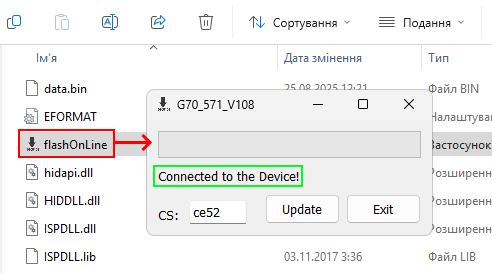
IMPORTANT: Do not disconnect the mouse or turn off the computer during the update process, as this will damage the mouse.
After the program completes the update, you will see the message "Update Success!". Only after this, click the "Exit" button.
